


Every year, millions of people around the world lose significant amounts of money to tech support scams. These deceptive schemes exploit everyday fears about computer viruses, account security, and digital safety. Whether you are an experienced internet user or just getting started, understanding how tech support scams work is the first step toward protecting yourself. This guide offers a clear, practical breakdown of the warning signs, tactics used by fraudsters, and the steps you can take if you have been targeted.
What Are Tech Support Scams and How Do They Work?
A tech support scam is a type of online fraud in which criminals pose as representatives of well-known technology companies such as Microsoft, Apple, or Google. The goal is to convince victims that their device has a serious problem that requires immediate attention. In reality, there is no problem at all. The scammer simply wants access to your device, your financial information, or both.
These scams typically unfold in one of several ways. You may receive an unsolicited phone call from someone claiming to be a technician. Alternatively, you may encounter a pop-up tech support scam while browsing the internet, where an alarming message fills your screen warning of a virus or system failure. Some scammers send phishing emails with links that redirect to fake support portals. Others place deceptive advertisements online that encourage you to call a toll-free number.
Once contact is made, the scammer usually asks you to install remote access software, giving them full control over your device. From that point on, they may steal passwords, plant malware, or demand payment for fake services. This is how tech support scams work at their core: they manufacture fear and urgency to pressure victims into compliance.
If you have encountered a suspicious message or unsolicited call from someone claiming to be tech support, consider documenting the incident and reporting it at ScamsReport.net to help protect others.
The Rising Threat of Tech Support Scams in the Digital Age
As more of our daily lives move online, the opportunity for online tech support fraud continues to grow. Scammers are no longer limited to phone calls. They operate across social media, email, pop-up ads, and even search engine results. In some cases, fraudsters buy legitimate-looking advertisements on Google or Bing so their fake support numbers appear at the top of search results.
The rise of remote work has also created new vulnerabilities. People are more dependent on their devices than ever before, and a sudden technical-sounding warning can provoke immediate panic. This is precisely what scammers count on. Understanding the environment in which these scams thrive is essential for cybersecurity awareness.
It is worth noting that online fraud prevention is not the sole responsibility of technology companies or governments. Individuals must also take an active role in protecting themselves and educating those around them.
Why Do Tech Support Scams Target Individuals?
Tech support scams are designed to exploit trust, fear, and urgency. Fraudsters know that most people are not deeply familiar with how their devices operate, which makes it easy to convince them something has gone wrong. The psychological manipulation is deliberate and calculated.
Scammers typically impersonate brands people already trust. By claiming to be from Microsoft or Apple, they borrow credibility they have not earned. They may reference real-sounding error codes, official-looking windows, or even replicate the visual design of legitimate company websites. Understanding the psychology behind tech support scams helps victims recognize the manipulation before it succeeds.
Many victims also feel embarrassed after being scammed, which leads them to stay silent. This silence benefits the criminals, who continue operating freely. Reporting incidents openly, even anonymously, is a meaningful contribution to combating online fraud.
Who Is Most at Risk for Tech Support Scams?
While anyone can fall victim to a tech support scam, certain groups face higher risk. Older adults are frequently targeted because they may be less familiar with digital red flags. People who use their computers heavily for banking, investment, or business are also common targets because the potential financial gain for scammers is higher.
Investors and traders can be especially vulnerable. In some cases, scammers combine tech support fraud with investment fraud, using access to a victim’s device to interfere with online trading accounts or redirect withdrawals. Questions like how to spot and avoid cryptocurrency scams, or how to avoid becoming a victim of CFD scams, often lead people to discover that these financial schemes and tech support fraud can overlap. Scammers evolve their methods, and today’s threat landscape includes types of scams that blend multiple forms of deception.
Beginners who are new to online services, and even experienced users who are distracted or stressed, can also be caught off guard. Vigilance is not a matter of intelligence; it is a matter of awareness.
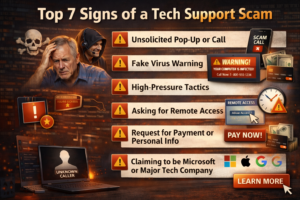
Top 7 Signs of a Tech Support Scam
How to Identify Warning Signs Before It Is Too Late?
Recognizing the warning signs of tech support scams early can prevent significant harm. Here are the seven most common red flags to watch for:
- Unsolicited contact from a company you did not reach out to first. Legitimate tech companies do not make cold calls about device problems.
- Pop-up warnings that cannot be closed and urge you to call a phone number immediately.
- Pressure to act immediately, with warnings that your files or accounts will be deleted if you wait.
- Requests to install remote access software such as AnyDesk or TeamViewer without a clear, verifiable reason.
- Demands for payment via gift cards, wire transfer, or cryptocurrency, which are irreversible payment methods.
- Vague or inconsistent explanations of the alleged problem, often filled with confusing technical jargon.
- Requests for your passwords, banking credentials, or access to financial accounts.
If any of these warning signs apply to a situation you have experienced, it may be worth reporting the incident. Early reporting can help prevent further losses and alert others to the same scheme.
10 Common Tech Support Scams to Watch Out For
Understanding the Most Frequently Reported Schemes
Online tech support fraud comes in many forms. Knowing the most common variations helps you identify a scam quickly and respond appropriately.
- Microsoft Windows error pop-ups that claim your computer is infected and provide a number to call.
- Apple ID suspension emails that direct you to a fake support page designed to steal your login credentials.
- Fake antivirus alerts that appear in your browser and cannot be easily dismissed.
- IRS or government impersonation combined with a tech support twist, where scammers claim your computer has been flagged for illegal activity.
- Google account lockout messages prompting you to verify your identity through an unofficial portal.
- Refund scam tech support calls, where a scammer pretending to be tech support contacts you about an overpayment and asks you to send back funds via gift cards.
- Fake software update alerts that install malware when clicked.
- Social media tech support pages that mimic official company accounts and respond to support queries with phishing links.
- Search engine ads that place fake support numbers above legitimate company listings.
-
The common thread across all these types of scams is the use of fear, urgency, and impersonation. If something feels wrong, trust that instinct.
Where Do Tech Support Scams Typically Originate?
Tech support scam operations are global. Large-scale fraud operations have been documented in multiple countries, often running call centers that target victims in North America, Europe, and Australia. These operations are sophisticated and well-resourced, sometimes employing dozens of people.
The digital nature of these scams makes them difficult to trace. Scammers use voice-over-internet services to mask their location, spoof caller ID to display familiar numbers, and operate websites that are taken down and recreated quickly. International coordination between law enforcement agencies is improving, but reporting remains essential for building cases against criminal networks.
Questions like where to report forex trading scams or how the ultimate guide to avoiding Bitcoin scams applies to international victims reflect the global nature of modern fraud. Regardless of where a scam originates, the impact on victims is real and can be severe.
When Should You Be Suspicious of Tech Support Offers?
The simple rule is this: be suspicious any time tech support reaches out to you without prompting. Legitimate companies do not monitor your device remotely and then call you about detected issues. If you receive any communication, whether by phone, pop-up, email, or social media message, claiming that your device needs attention, treat it as suspicious until proven otherwise.
Be especially cautious if the contact arrives during a stressful moment, such as after a financial transaction, during an online purchase, or while using a new service for the first time. Scammers are aware of these high-alert moments and may time their approaches accordingly.
A Step-by-Step Guide to Protecting Yourself from Tech Support Scams
8 Ways to Protect Yourself from Tech Support Scams

- Never call a number displayed in a browser pop-up. Close the window using Task Manager if necessary, and contact the official company directly through their verified website.
- Do not give remote access to your device unless you initiated the support request through an official channel and have fully verified the technician’s identity.
- Keep your operating system and security software updated to reduce the chance of vulnerabilities being exploited.
- Use a reputable antivirus program and enable your firewall to block unauthorized access attempts.
- Verify any tech support contact by independently looking up the company’s official phone number or support page.
- Pay attention to payment requests. No legitimate tech support company will ask for payment via gift cards or cryptocurrency.
- Educate family members, especially older relatives, about the common tactics used in scam alert tech support situations.
- Report any suspicious contact immediately to your national consumer protection authority and to scam reporting platforms where your experience can help warn others.
9 Tips for Recognizing Legitimate Tech Support
How to Tell the Difference Between Real Help and a Fake Tech Support Operation?
- Legitimate support is initiated by you, not by an unexpected call or pop-up.
- Real companies provide verifiable contact information through their official websites.
- Official support teams never ask for payment in gift cards, wire transfers, or cryptocurrency.
- Genuine technicians explain issues in clear language and do not rely on fear or urgency to pressure you.
- Verified support portals use encrypted connections (look for HTTPS in the browser address bar).
- Legitimate representatives do not ask for your password; they provide their own secure authentication process.
- Official companies have published privacy policies and terms of service that are easy to locate.
- Real support interactions are documented with case numbers, follow-up emails, and verifiable identifiers.
- You can end a call with legitimate support at any time without being threatened or pressured to stay on the line.
5 Steps to Take After Falling for a Tech Support Scam
What to Do After a Tech Support Scam Has Occurred?
If you suspect you have been a victim of a tech support scam, acting quickly can limit the damage. Here is what to do:
- Disconnect from the internet immediately if a remote access session is still active, and power off your device if needed.
- Change all your passwords, starting with email and banking accounts, from a separate, unaffected device.
- Contact your bank or financial institution to report the incident, especially if payment was made or financial information was shared.
- Run a thorough antivirus and malware scan on your device before using it again.
- Report the incident to relevant authorities and to scam tracking platforms. Tech support scam recovery begins with documentation and reporting.
If you have faced withdrawal issues from an online account following a tech support incident, document every detail and report it. Sharing your experience may help investigators and protect future victims.
How to Report Tech Support Scams Effectively
Reporting a tech support scam is one of the most impactful things a victim can do. Many people do not report because they feel embarrassed or believe nothing will come of it. In reality, reports contribute to patterns that law enforcement agencies use to build cases against criminal networks.
When filing a report, include as much detail as possible: the phone number used, any website addresses, names provided by the scammer, screenshots of pop-ups, and a description of what was requested. Even partial information can be valuable.
You can report tech support scam online through your national consumer protection agency, cybercrime reporting portals, and dedicated scam reporting platforms. Victims can also securely report suspicious tech support activity at ScamsReport.net, where submissions are reviewed and may be escalated to the appropriate authorities.
Tech Support Scams: Myths and Realities
Common Misconceptions That Keep Victims Silent
One persistent myth is that only technically inexperienced people fall for tech support scams. In reality, these schemes are designed by professionals who understand human psychology. They create scenarios that could plausibly affect anyone.
Another misconception is that reporting a scam is pointless. In fact, reported scams are used by platforms, law enforcement, and consumer protection organizations to shut down fraudulent operations and improve scam alert tech support systems globally.
Some victims also believe that because they paid by gift card or cryptocurrency, there is nothing that can be done. While recovery of funds is never guaranteed and no one should be promised otherwise, reporting still matters. It creates a record, supports investigations, and may lead to action that benefits other victims.
How to Educate Yourself and Others About Tech Support Scams
Cybersecurity awareness begins at home. Talk to your family, friends, and colleagues about how tech support scams work and what to do if they encounter one. Share information about common red flags and encourage people to verify before they trust.
Schools, community centers, and workplaces are also excellent venues for spreading awareness. Many organizations offer free resources on online fraud prevention that can be distributed or displayed in shared spaces.
Reading guides like this one, exploring consumer protection websites, and staying current on scam alerts are all practical steps toward becoming a more informed digital citizen. An informed community is a resilient community.
The Role of Technology in Combating Tech Support Scams
Technology companies are investing in automated systems to detect and block phishing scams, fake support advertisements, and malicious pop-up tech support scam campaigns. Browser warnings, spam filters, and AI-based fraud detection tools are becoming more effective each year.
However, technology alone cannot stop determined criminals. Human judgment remains the most important defense. No filter or firewall can replace a well-informed user who knows how to identify a fake tech support operator or a suspicious pop-up.
Organizations focused on cybersecurity awareness are continuously working to improve reporting infrastructure, making it easier for victims and potential victims to flag suspicious activity before harm occurs.
How to Identify and Avoid Tech Support Scams: A Summary
Avoiding tech support scams ultimately comes down to awareness, verification, and healthy skepticism. Never trust unsolicited contact, never allow remote access from someone you did not approach first, and never pay for services using gift cards or cryptocurrency.
When in doubt, hang up, close the browser, and verify through official channels. Share what you know with others. Report what you encounter. These simple actions collectively reduce the power of scammers and protect communities worldwide.
Take Action: Report, Protect, and Help Others Stay Safe
Tech support scams thrive when victims stay silent. Every unreported incident is an opportunity for scammers to continue targeting others. If you believe you have encountered a suspicious tech support operator, a misleading pop-up scheme, or have experienced withdrawal issues following a tech support incident, consider reporting it.
Your experience matters. Sharing what happened, even the smallest details, can help investigators identify patterns, disrupt criminal operations, and protect people who have not yet been targeted. You do not have to feel certain that you have been scammed to make a report. If something felt wrong, that is reason enough to speak up.
Victims and concerned individuals are encouraged to file a complaint and submit their evidence at scamsreport.net, a platform where cases are reviewed by specialists and appropriate guidance is provided. There is no pressure and no promise of a specific outcome, but your report could make a meaningful difference.
Stay informed. Stay cautious. And if you have been affected, know that support is available and that reporting is always the right next step.
Are You a Victim of Tech Support Scams?
If you have fallen for a tech support scam, don’t freak out. For professional assistance, contact Scams Report. We offer a free consultation to walk you through the procedure and assist you in getting the money back that was stolen. Take the first step toward justice today by letting us assist you in recovering your hard-earned money!
Visit our Facebook Page